Sigh it can be frustrating sometimes working on my various programming projects. My main solution I work with now consists of 94 projects. View Screenshot
Some of the projects could be considered "Done" but I have yet to upload them to this website and some are still only partially written or working. I have been wanting to create a series of video tutorials that walk through each project but I keep finding myself putting it off, partly because making videos can be very time consuming, and I tend to have too high of standards when making them, "Dam, I should not have said that", "I keep rambling on about off topic stuff", "Forgot to mention this or that feature", "Stupid lispy voice :P" etc etc
It will probably be a while (possible never) before I get around to making any of the videos.
Besides all that I have been doing more work with using xna and winforms and have created a simplfied version of the control then what microsoft has on the xna creators club web site. The reason I created a simplified version of the control is because I needed the control to integrate better with my level editing window. I have provided a preview image below of the control in use in my level editor. The source code can be downloaded here. SimplifiedWinformControl.zip (1.58 mb) (XNA 3.1)
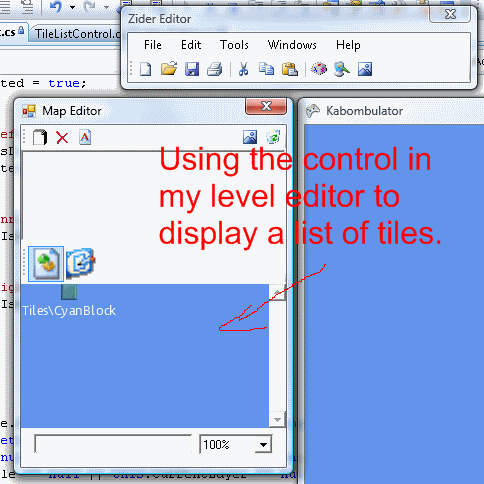
Also something to keep in mind that VS.NET 2008 seems to have issues when the name of the control is the same as the namespace that it resides in. In the example project you may encounter a compile error in the TextForm.Designer.cs file on this line of code "this.xnaControl = new SimplifiedWinformControl.SimplifiedWinformControl();" just delete the namespace off the begining so that it reads like this "this.xnaControl = new SimplifiedWinformControl();". To avoid the error be sure to name your control something other then the namespace that it belongs to. Something else to remember is that if the control is resized larger then the main game windows backbuffer then the control will only display what it can.
public class SimplifiedWinformControl : Control
{
    private Game game;
    public Texture2D Texture { get; set; }
    private SpriteBatch spriteBatch;

    public Game Game
    {
        get { return this.game; }
        set
        {
            // hold onto the game reference
            this.game = value;
            if (this.game == null) return;
            // create the sprite batch
            this.spriteBatch = new SpriteBatch(this.game.GraphicsDevice);
        }
    }

    /// <summary>
    /// Ignores WinForms paint-background messages. The default implementation
    /// would clear the control to the current background color, causing
    /// flickering when our OnPaint implementation then immediately draws some
    /// other color over the top using the XNA Framework GraphicsDevice.
    /// </summary>
    protected override void OnPaintBackground(PaintEventArgs pevent)
    {
        // do nothing here. If this is not overridden the control may have drawing issues O.o
    }

    protected override void OnPaint(PaintEventArgs e)
    {
        if (this.game == null)
        {
            // draw normal winform way
            e.Graphics.FillRectangle(System.Drawing.SystemBrushes.Control, this.ClientRectangle);
            e.Graphics.DrawString(this.GetType().FullName, this.Font,
                                    System.Drawing.SystemBrushes.ControlText, 0, 0);
        }
        else
        {
            // draw xna way
            var gr = this.game.GraphicsDevice;
            var oldVP = gr.Viewport;

            // set the graphics viewport to the size the the controls client area
            var newVP = new Viewport()
            {
                Width = this.ClientSize.Width,
                Height = this.ClientSize.Height,
                MinDepth = 0,
                MaxDepth = 1
            };

            gr.Viewport = newVP;

            // clear then draw something onto the control
            gr.Clear(Color.CornflowerBlue);
            this.spriteBatch.Begin();
            this.spriteBatch.Draw(this.Texture, Vector2.Zero, Color.White);
            this.spriteBatch.End();

            // display it onto the control
            try
            {
                var rect = new Rectangle(0, 0, this.ClientSize.Width, this.ClientSize.Height);
                gr.Present(rect, null, this.Handle);
            }
            catch (Exception)
            {
                // Present might throw if the device became lost while we were
                // drawing so we just swallow the exception.
            }

            // restore previous viewport
            gr.Viewport = oldVP;
        }
    }

    protected override void OnCreateControl()
    {
        // check if we are not in design mode and if not hook into the application idle event
        if (!this.DesignMode)
        {
            // just invalidate the control so that it will be redrawn
            // you could also put in some logic to restrict how often the control get invalidated
            Application.Idle += ((sender, e) => { this.Invalidate(); });
        }
        base.OnCreateControl();
    }

    // not really nessary in this simple example to have a dispose here but i put it in anyway
    protected override void Dispose(bool disposing)
    {
        // perform some cleanup
        if (this.spriteBatch != null) this.spriteBatch.Dispose();
        this.spriteBatch = null;
        // we dont need to dispose of the texture here but I did anyway it will be
        // disposed by the content manager. :P But if you have texture(s) you created
        // your self then this is where they would get disposed
        if (this.Texture != null) this.Texture.Dispose();
        this.Texture = null;
        base.Dispose(disposing);
    }
}